Heat in a plate: a hot spot cooling in two dimensions
Heat in a plate: a hot spot cooling in two dimensions
Heat in a bar added time to a PINN. This lesson adds a second space dimension and an insulated edge, and then does something new: it judges the network against a finite element solution, field by field and time by time. The network we train (four layers of 40 neurons, tanh) ends with a relative L2 error of 1.17 % against that reference.
#studio #heat #time-dependent #fem #validation · 30 min read
Before you start. You should have done Heat in a bar and Poisson on a square. Open the Studio in another tab. To run the comparison you need Python with
numpyandscipyand two small files from the end of this page.
1. The problem
A thin square plate has sides of length 1. A hot spot sits to the left of centre. Three edges are held cold and the right edge is insulated. How does the temperature change for $0 \le t \le 1$?
$$ \frac{\partial u}{\partial t} = \alpha \left( \frac{\partial^2 u}{\partial x^2} + \frac{\partial^2 u}{\partial y^2} \right), \qquad (x, y) \in [0,1]^2, \quad 0 < t \le 1, \quad \alpha = 0.05 . $$
| Edge | Condition |
|---|---|
| Left, $x = 0$ | $u = 0$ (held cold) |
| Bottom, $y = 0$ | $u = 0$ |
| Top, $y = 1$ | $u = 0$ |
| Right, $x = 1$ | $\partial u / \partial x = 0$ (insulated, no heat flows out) |
The plate starts with a Gaussian hot spot centred at $(0.35, 0.5)$:
$$ u(x, y, 0) = \exp\!\big(-50\,[(x - 0.35)^2 + (y - 0.5)^2]\big). $$
The spot is almost zero at the walls. At the left wall it is $e^{-6.125} \approx 0.002$, small enough that the start and the cold edge nearly agree.
Three things to know before computing anything
- The temperature never goes below zero. The plate starts at or above zero and every edge is either held at zero or insulated, so nothing can cool below zero. A network is not told this, which makes it a useful check later.
- Heat only leaves through the three cold edges. The total heat, $\int u \, dA$, starts at $\pi/50 \approx 0.0628$ and falls to 0.0328 by $t = 1$, so about 48 % has left the plate.
- Early on, the plate behaves as if the walls were not there. For a Gaussian spreading in free space, the peak is $0.01 / (0.01 + 2\alpha t)$. At $t = 0.5$ that is 0.1667, and the finite element value is 0.1640. At $t = 1$ it is 0.0909 against 0.0812: the cold walls now pull the peak down by about 11 %. You can do this check with a calculator, before any solver.
The exact answer
This problem has a closed-form solution, because the start is a product of a function of $x$ and a function of $y$ and the edges separate. In $x$ the eigenfunctions are $\sin(a_k x)$ with $a_k = (k + \tfrac12)\pi$ (zero at $x = 0$, zero slope at $x = 1$). In $y$ they are $\sin(n\pi y)$. The solution is the product
$$ u(x, y, t) = 4\, X(x, t)\, Y(y, t), \qquad X = \sum_{k \ge 0} I_k \sin(a_k x)\, e^{-\alpha a_k^2 t}, \qquad Y = \sum_{n \ge 1} J_n \sin(n\pi y)\, e^{-\alpha n^2 \pi^2 t}, $$
with $I_k = \int_0^1 e^{-50(x - 0.35)^2} \sin(a_k x)\,dx$ and $J_n = \int_0^1 e^{-50(y - 0.5)^2} \sin(n\pi y)\,dy$. The reference script evaluates it with 400 terms in each series. It is useful here as an independent check on the finite element solution, not as the main reference, because most real plates do not have such tidy edges.
2. How a PINN sees the problem
The network takes three inputs, $(x, y, t)$, and gives one output, $u$. The loss has six terms, each a mean squared residual:
- the heat equation at points inside the plate and inside $0 < t < 1$,
- $u = 0$ on the left, bottom and top edges (three terms),
- $\partial u / \partial n = 0$ on the right edge,
- $u$ equal to the Gaussian at $t = 0$.
The insulated edge. The Studio takes the outward normal. On the right edge it points in the $+x$ direction, so $\partial u / \partial n = \partial u / \partial x$, and insulated means
0.0.Why a custom residual. The Studio's named Heat equation is $u_t - a\,u_{xx}$, which has no $y$. For a plate you write the residual yourself, as
u_t - 0.05*(u_xx + u_yy).
3. The plan: one block per decision
| Block | What it holds |
|---|---|
| Domain | Rectangle, $x$ and $y$ from 0 to 1, time on from 0 to 1 |
| PDE | Parabolic, Custom residual |
| BC 1 to BC 4 | One per edge: three Dirichlet, one Neumann |
| IC | The Gaussian |
| Network | Default: four layers of 40, tanh |
| Loss, Optimiser, Train | Fixed equal weights; Adam, then L-BFGS |
| Visualisation, Report | A field plot at three times, a loss curve, a results table |
That is 13 blocks and 19 wires.
4. Step by step in the Studio
Step 1: Start a notebook. On the Studio page, name it Heat in a plate, choose An empty canvas, and press Create notebook.
Step 2: Place 13 blocks. Domain, PDE, four Boundary condition blocks, Initial condition, Network, Loss, Optimiser, Train, Visualisation and Report.
Step 3: Set the Domain. Geometry Rectangle, $x$ from 0 to 1, $y$ from 0 to 1. Tick Time dimension, with t initial 0 and t final 1. Set Interior points to 10000, Default boundary points to 200 and Initial points to 2000. Press Detect boundaries. You should read: BC1 (left), BC2 (right), BC3 (bottom), BC4 (top).
Step 4: Set the PDE. Equation type Parabolic, Equation Custom residual:
u_t - 0.05*(u_xx + u_yy)
Step 5: Set the four edges. Wire each Domain boundary port to its own BC block, hovering over the port to confirm which edge it is.
| Domain port | Edge | Condition type | Value |
|---|---|---|---|
| BC1 | left | Dirichlet | u = 0.0 |
| BC2 | right | Neumann | du/dn = 0.0 |
| BC3 | bottom | Dirichlet | u = 0.0 |
| BC4 | top | Dirichlet | u = 0.0 |
Step 6: Set the start. In the IC block, type:
exp(-50*((x-0.35)**2 + (y-0.5)**2))
Step 7: Set the learning blocks. Leave the Network at 4 × 40 with tanh and the Loss at fixed equal weights. In the Optimiser block use Adam at a learning rate of 0.001 and tick Second stage (L-BFGS). In the Train block set 10000 epochs and seed 0.
Step 8: Wire. Press on a dot, drag to a lit dot of the same colour, release. The 19 wires, in order:
- Domain Coords to PDE Coords, and to Network Coords (2 wires)
- Domain Interior to PDE Interior
- Domain BC1 to BC4 to the four BC blocks (4 wires)
- Domain Initial to IC Initial
- PDE PDE residual to Loss, and Network to Loss (2 wires)
- The four BC outputs and the IC output to Loss BC / IC (5 wires)
- Loss to Train Loss, Optimiser to Train Optimiser
- Train Model to Visualisation and to Report (2 wires)
Check: the Graph check strip reads nothing to flag. If it says the Domain has no time dimension, tick Time dimension.
Step 9: Generate and run. Press Generate code, then Download .py. This problem has three inputs, 10,000 interior points and second derivatives in two directions, so it is heavier than the one-dimensional lessons. A GPU helps, and Colab is one way to get one. The script writes figures/field_t0.png, figures/field_t0.5.png, figures/field_t1.png, figures/loss.png and results.csv.
A note on the points. The script we ran shows 198 points per edge in each
sample_bcfunction, so that is what this run used.
5. The reference solution
We use finite elements: quadratic (Q2) elements on a uniform mesh of squares, with Crank–Nicolson time stepping. The first step is replaced by two small implicit-Euler steps, the standard way to damp the oscillations that Crank–Nicolson can produce when the start does not agree exactly with the edges. The matrices are built from one-dimensional quadratic elements, so the whole solver is short and has no dependency beyond numpy and scipy.
We checked it two ways. First, against the exact series above, on 20,000 random points with $t > 0.05$:
| Elements | Time steps | Relative L2 difference from the exact series | Largest difference |
|---|---|---|---|
| 16 | 100 | $6.7\times10^{-4}$ | $1.0\times10^{-3}$ |
| 32 | 200 | $1.3\times10^{-4}$ | $2.7\times10^{-4}$ |
| 64 | 400 | $3.0\times10^{-5}$ | $7.9\times10^{-5}$ |
| 96 | 1,000 | $5.3\times10^{-6}$ | $1.3\times10^{-5}$ |
| 128 | 1,000 | $4.7\times10^{-6}$ | $1.2\times10^{-5}$ |
Second, the peaks in section 1: 0.1640 at $t = 0.5$ and 0.0812 at $t = 1$, where the free-space estimate is 0.1667 and 0.0909.
The reference behind every number below is the 96 × 96 mesh with 1,000 steps. On the 10,000 report points its relative difference from the exact series is $1.5\times10^{-5}$, about 800 times smaller than the network's error. The last two rows of the table differ little, so the reference is converged to about $5 \times 10^{-6}$ at this time step. Any error in the numbers below is the network's.
6. Results: PINN against finite elements
What was compared
results.csv holds the network's value at 10,000 new random points $(x, y, t)$. The script draws them after training, so they are not the points the network was trained on. We evaluated the reference at the same points and computed the error there. The relative L2 error is $\|u_{\text{PINN}} - u_{\text{FEM}}\|_2 / \|u_{\text{FEM}}\|_2$ over all points, so it is an average over space and time.
| Metric | Value |
|---|---|
| Relative L2 error | 1.17 % |
| RMS error | $1.0\times10^{-3}$ |
| Mean absolute error | $7.4\times10^{-4}$ |
| Median, 95th and 99th percentile of the absolute error | $5.7\times10^{-4}$, $2.0\times10^{-3}$, $3.1\times10^{-3}$ |
| Largest error | $1.1\times10^{-2}$, at $(x, y, t) = (0.44, 0.43, 0.015)$: PINN 0.481, FEM 0.492 |
| Mean signed error (PINN minus FEM) | $-1.9\times10^{-4}$ |
| Lowest network value | $-6.2\times10^{-3}$ (the reference never goes below 0) |
| Points where the network is negative | 4.5 % |
For scale, the reference has an RMS of 0.0858 over these points and a largest value of 1 at $t = 0$. The network's largest error is about 1 % of that peak.
The fields
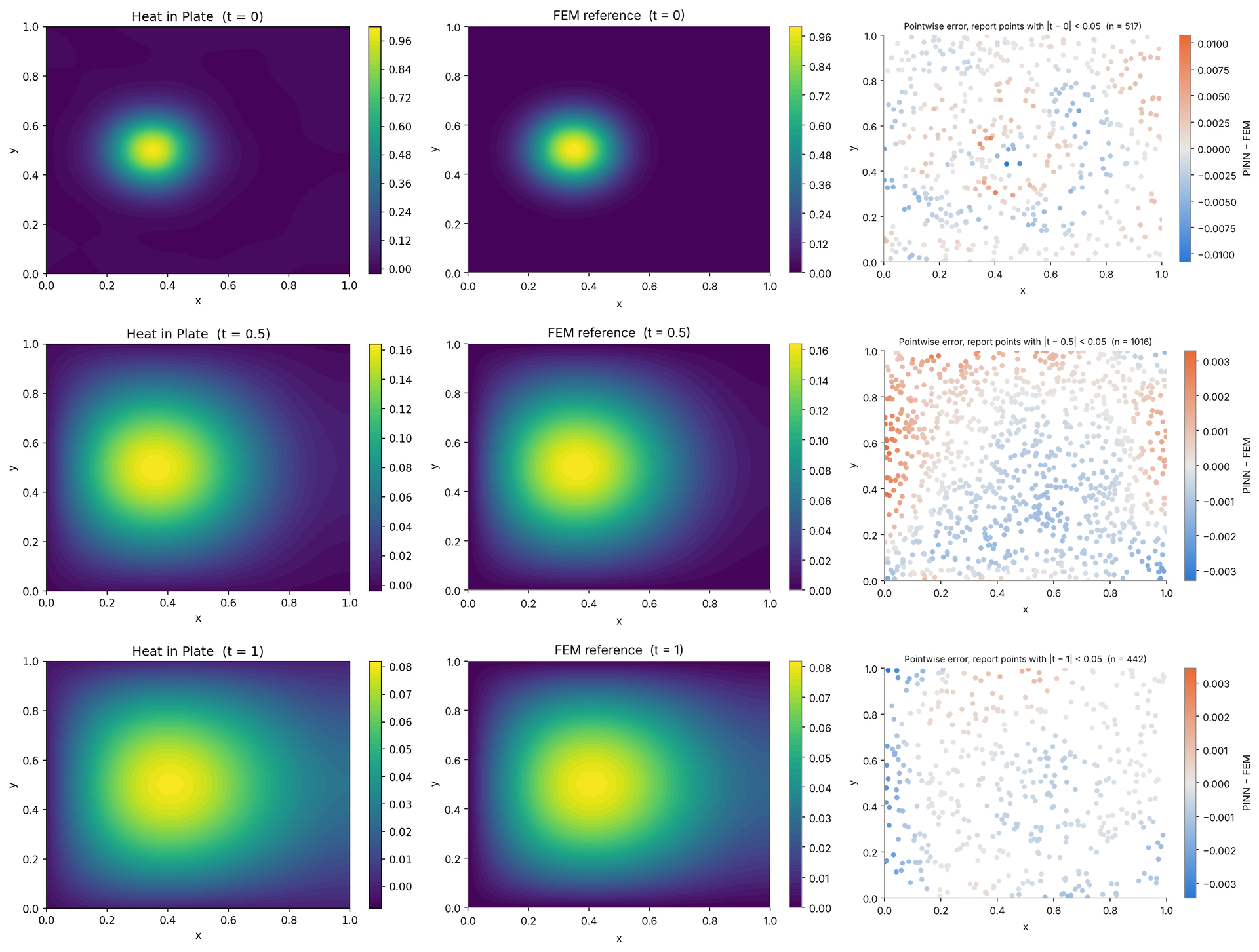
Each panel has its own colour scale, and the error panels use a different scale in each row (about ±0.01, ±0.003 and ±0.003). The error panels use each point's own time, within 0.05 of the row's time.
The shapes agree: the spot spreads, its centre drifts to the right (the peak moves from $x = 0.35$ to $x = 0.41$ by $t = 1$, because the left edge is cold and the right edge is insulated), and the left, bottom and top edges drain it. The colour bars of the Studio figures end at about 0.164 and 0.082 for $t = 0.5$ and $t = 1$. The reference peaks are 0.1640 and 0.0812. That puts the network's peaks within about 1 % of the reference, though a value read off a colour bar is only approximate.
The error at $t = 0.5$ is a smooth, large-scale pattern, about $\pm 0.003$, positive in the upper left and negative in the middle and lower half. It is not scatter. The network has learned a field that is slightly wrong in a smooth way.
The error through time
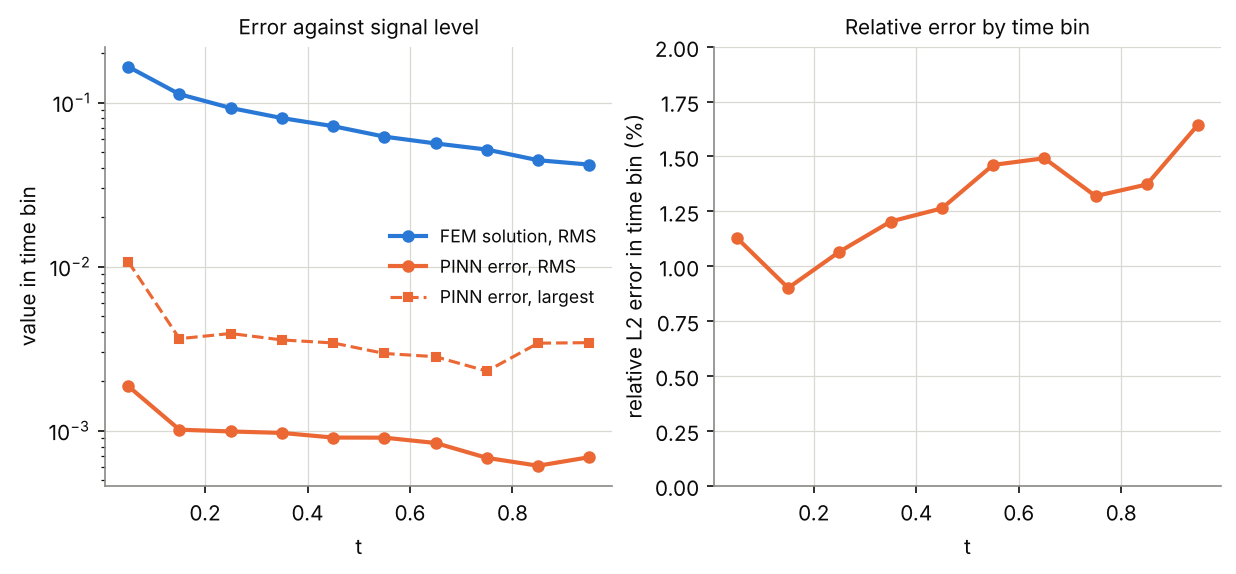
| $t$ | Points | Reference RMS | PINN error RMS | Largest error | Relative L2 error |
|---|---|---|---|---|---|
| 0.0 to 0.1 | 1,029 | 0.165 | $1.9\times10^{-3}$ | $1.1\times10^{-2}$ | 1.13 % |
| 0.1 to 0.2 | 928 | 0.113 | $1.0\times10^{-3}$ | $3.6\times10^{-3}$ | 0.90 % |
| 0.2 to 0.3 | 960 | 0.093 | $9.9\times10^{-4}$ | $3.9\times10^{-3}$ | 1.07 % |
| 0.3 to 0.4 | 1,018 | 0.080 | $9.7\times10^{-4}$ | $3.6\times10^{-3}$ | 1.20 % |
| 0.4 to 0.5 | 1,023 | 0.072 | $9.1\times10^{-4}$ | $3.4\times10^{-3}$ | 1.26 % |
| 0.5 to 0.6 | 1,011 | 0.062 | $9.1\times10^{-4}$ | $3.0\times10^{-3}$ | 1.46 % |
| 0.6 to 0.7 | 1,001 | 0.056 | $8.4\times10^{-4}$ | $2.8\times10^{-3}$ | 1.49 % |
| 0.7 to 0.8 | 1,012 | 0.052 | $6.8\times10^{-4}$ | $2.3\times10^{-3}$ | 1.32 % |
| 0.8 to 0.9 | 1,061 | 0.045 | $6.1\times10^{-4}$ | $3.4\times10^{-3}$ | 1.37 % |
| 0.9 to 1.0 | 957 | 0.042 | $6.9\times10^{-4}$ | $3.4\times10^{-3}$ | 1.65 % |
The absolute error shrinks as the plate cools, from an RMS of $1.9\times10^{-3}$ in the first tenth to about $6.9\times10^{-4}$ at the end. The solution shrinks faster, so the relative error drifts up, from about 1 % in the first half of the time to about 1.5 % in the second. The largest error is in the first tenth, where the temperature changes fastest. The heat-equation residual tells the same story: its RMS is $4.9\times10^{-2}$ in the first tenth of the time and $3.3\times10^{-3}$ in the last.
Where the error sits
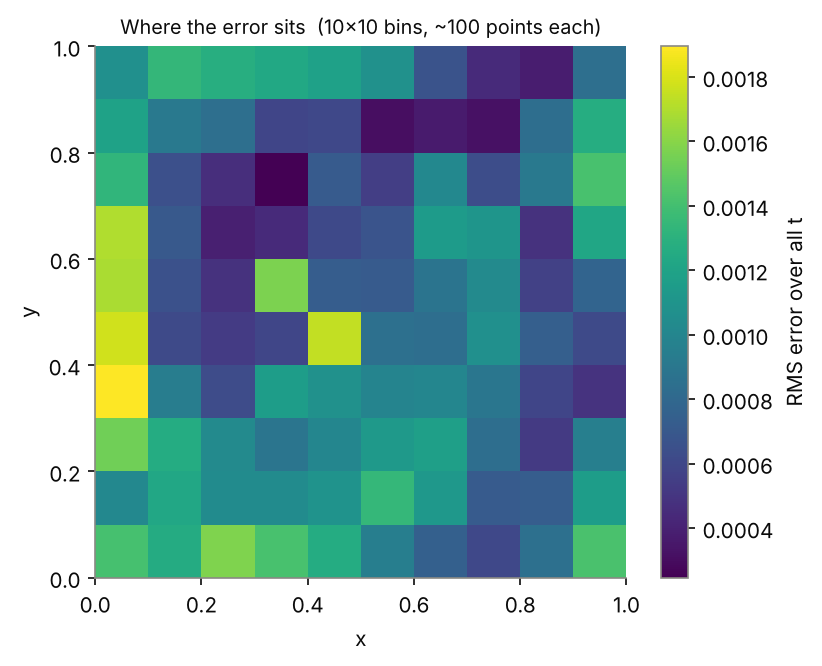
The error is highest along the left edge. The RMS error within 0.05 of the left edge is $1.8\times10^{-3}$, against $9.1\times10^{-4}$ for points at least 0.05 from the three cold edges. We have not tested why. The left edge is where the start, at 0.002, does not quite equal the cold boundary value, but that mismatch is smaller than the error we see there at later times, so do not assume it is the cause. Within 0.05 of the insulated right edge the RMS error is $1.2\times10^{-3}$, also a little above the interior.
The network goes negative
The reference is never below zero, but the network is below zero at 4.5 % of the points, down to $-6.2\times10^{-3}$. Nothing in the loss asks for non-negativity. The values are small, but a negative temperature is a clear sign that the field is not exact, and a quick check you can make on any heat problem without a reference.
A small loss is not a small error everywhere
The heat-equation term in the loss is $4.2\times10^{-5}$ at the end, which is an RMS residual of $6.5\times10^{-3}$ on the training points. On the 10,000 new points the RMS residual is $1.6\times10^{-2}$, about 2.6 times larger. Without the five largest residuals it is $9.6\times10^{-3}$. The residual is largest near the start and the hot spot (the largest, 0.82, is at $(x, y, t) = (0.345, 0.520, 0.004)$). The network satisfies the equation better at its training points than between them. The script draws the interior points once and keeps them, so more points may help; try it in the exercises.
Parity
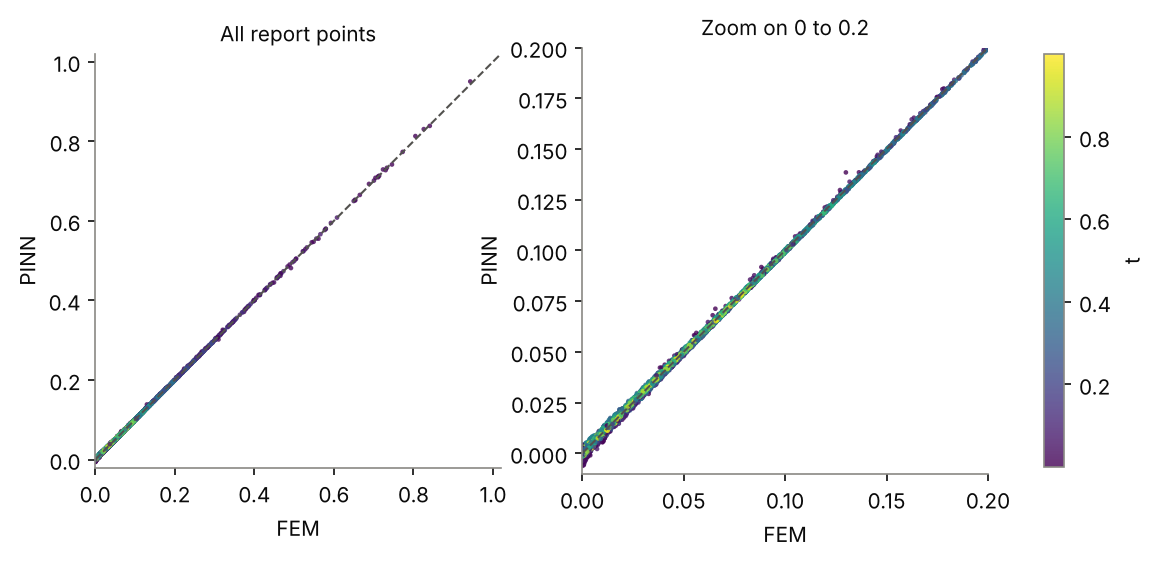
The points lie in a thin band around the diagonal. In the zoom the band is widest, relative to the values, for reference values near zero, and a few points there fall below zero.
The training record
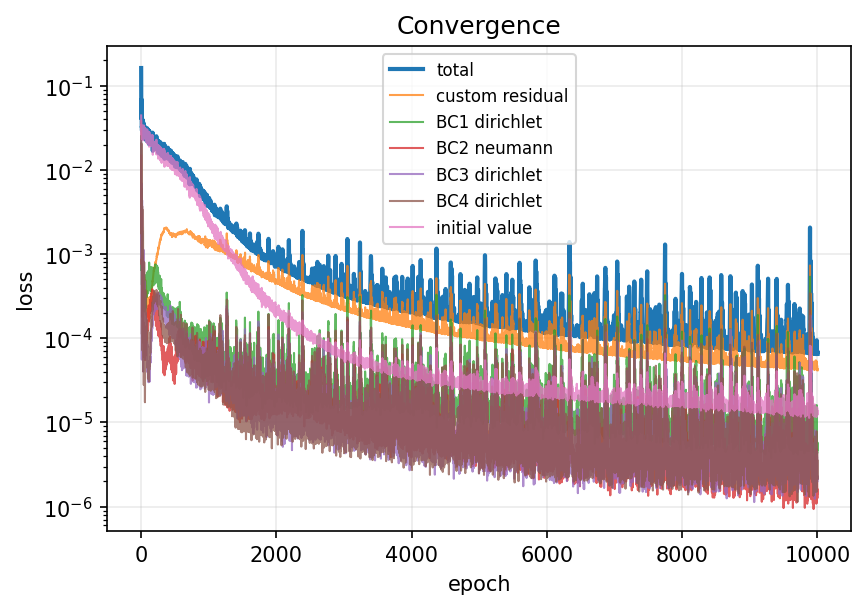
At the end the total loss is $6.5\times10^{-5}$. The heat-equation term is 64 % of it, the initial condition 19 %, and the four edges together 17 %.
Do not worry about the spikes, but check the end. In the last 500 Adam epochs the total loss has a median of $8.8\times10^{-5}$ and spikes as high as $2.1\times10^{-3}$. The script saves the weights from the end of training, so what matters is that the final value is in the calm band. Here it is: the L-BFGS stage took the total from $6.9\times10^{-5}$ to $6.5\times10^{-5}$, an improvement of 6.1 %.
7. What to report
For a PINN result to mean something to a reader, state:
- The reference, and how you know it is right. Here: Q2 finite elements on 96 × 96 elements, Crank–Nicolson with 1,000 steps, within $1.5\times10^{-5}$ of an exact series.
- Where you measured. Held-out random points, not training points, and how many (here 10,000).
- The relative L2 error over space and time, plus the RMS and the largest error with its location.
- The error through time. One number can hide an error that is concentrated at the start or the end.
- A physical check. Here, non-negativity. Others are conserved quantities, symmetries and bounds.
- The residual on new points, next to the training loss.
- The set-up: network size and activation, the number of points, the loss weights, the optimiser, the epochs, and whether the second stage was used.
- How many runs. This lesson reports one run. Rerun the notebook several times and give the range, as Poisson in one dimension does.
What this run does not show
- It is one run. Your run will land near these figures, not on them.
- The network, the points and the weights were the Studio defaults. Nothing was tuned.
- The error is measured at random points, so it is a sample estimate. With 10,000 points the time bins hold about 1,000 each, which is enough to see the pattern but not to separate small differences between neighbouring bins.
8. If something goes wrong
| What you see | Likely cause | What to do |
|---|---|---|
| Graph check: a parabolic equation evolves in time, but the Domain has no time dimension | Time is off | Tick Time dimension on the Domain |
| Graph check: No condition on BC… | A BC block is missing or not wired | Add it and wire the Domain port to its Boundary input |
| Heat piles up against the right edge, or drains through it | The right edge was entered as Dirichlet | Use Neumann, du/dn = 0.0 |
| The peak at $t = 0.5$ is far from 0.164 | A wrong coefficient in the residual | Check 0.05 and that both u_xx and u_yy are there |
| The field is smooth but smeared, and the error is several per cent | Too few points or too few epochs | More interior points, more epochs, and the second stage |
| The final loss is much higher than the calm band | The run ended on a spike | Rerun, and look at the last epochs of the loss curve |
9. Try it yourself
- Run the notebook three times. What is the range of the relative L2 error?
- Double the interior points. Does the residual on new points come closer to the training residual?
- Switch the second stage off. How much of the final loss does L-BFGS remove?
- Raise the weight on the initial condition. What happens to the error in the first tenth of the time, and to the rest?
- Change $\alpha$ to 0.02 in the residual and in
heat_2d_reference.py. Check the free-space peak formula first. Does the error change? - Open the generated script and find
residual_pde1. Where would you add a penalty on negative values?

10. Recap
- A 2D transient problem is the same recipe as a 1D one with one more input. Use Custom residual when the named heat equation has too few dimensions.
- Insulated means a Neumann condition with the outward normal; here, $u_x = 0$ on the right edge.
- Judge a PINN against a reference you have checked. Here the finite element solution agrees with an exact series to $1.5\times10^{-5}$.
- The network reached 1.17 % relative L2 error at 10,000 new points, with a largest error of $1.1\times10^{-2}$ at an early time.
- One number is not enough: look at the error through time and across the plate, check a physical property, and compare the residual on new points.
Reference scripts: heat_2d_reference.py (the finite element and series solutions) and heat_2d_compare.py (the comparison above, reading your results.csv).